Published on: 2025-08-15
As the successor to MetaTrader 4. MetaTrader 5 (MT5) supports a wider range of assets including Forex, stocks, and futures. Thanks to its powerful core, it allows up to 100 charts to run simultaneously and offers an extensive suite of analytical tools, making it a favourite among professional traders and algorithmic investors.
For anyone looking to trade across multiple asset classes, MT5 is an excellent choice. Below, we'll walk through how to install MT5 and place your first trade.
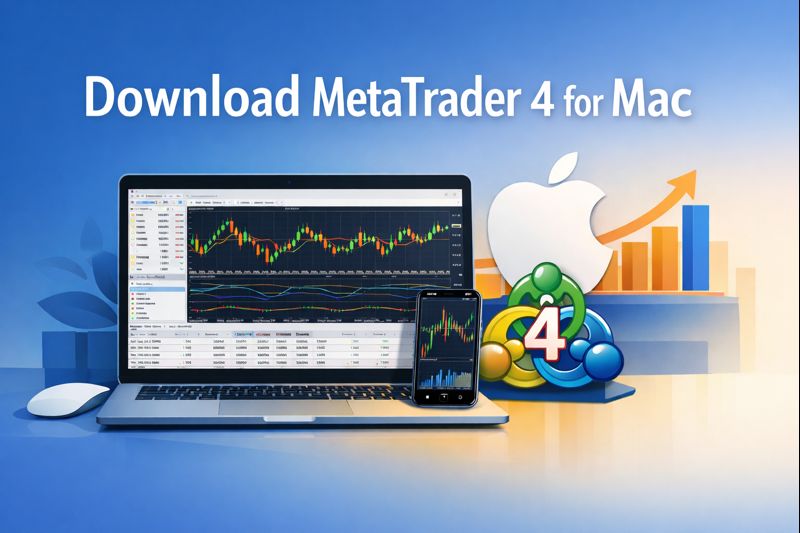
Download
To begin, obtain MT5 directly from your broker's official website and choose the appropriate version for your system.
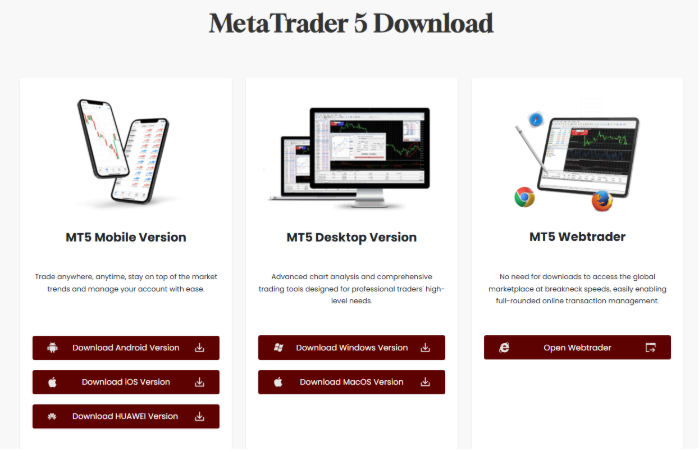
Avoid downloading MT5 from unfamiliar websites or third-party links. Steer clear of links claiming to be "official maintenance" sites, as these may contain malicious software.
Install
Follow the installation prompts until the process completes. Ensure the installation window displays the broker's full name. If the name is missing or appears incorrect, suspect that the software could be counterfeit.
Launch the application and find the option to log into your trading account.
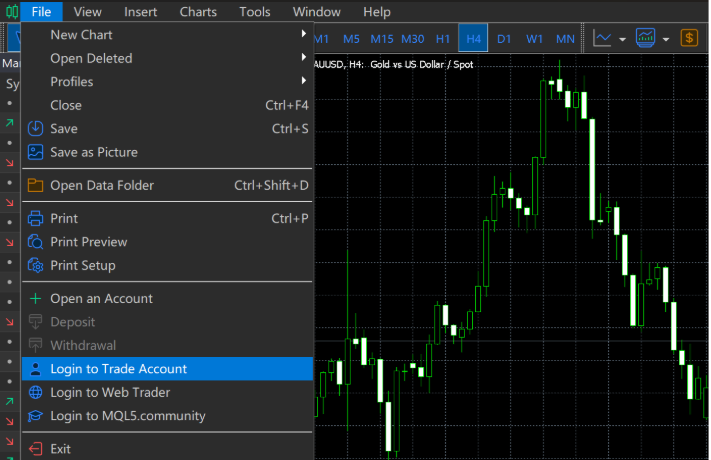
Enter your account number, password, and select the relevant server to access your account.
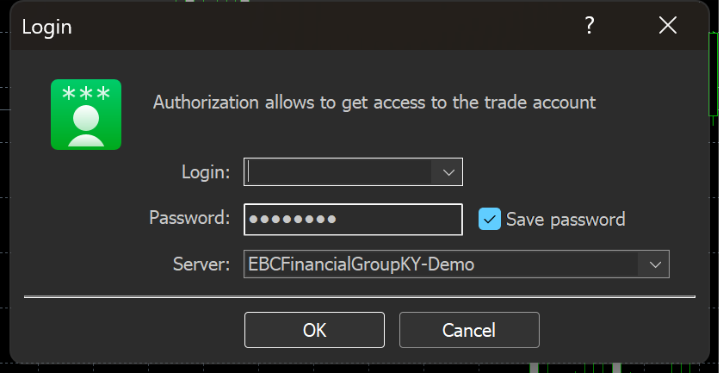
After logging in, you can start trading.
Before you can trade, add the symbols you want to follow. Click on the symbols list in the display.
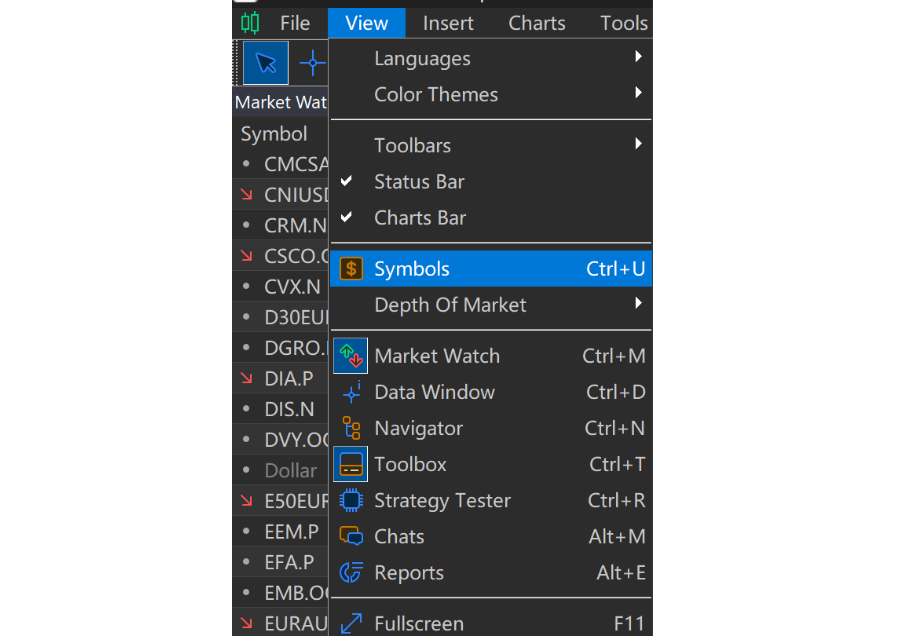
A full list of symbols will appear. MT5 supports not only forex but also stocks, indices, ETFs, and more. To add or remove symbols, use the Show/Hide buttons at the bottom. Clicking Show Symbol will make it appear in your Market Watch list.
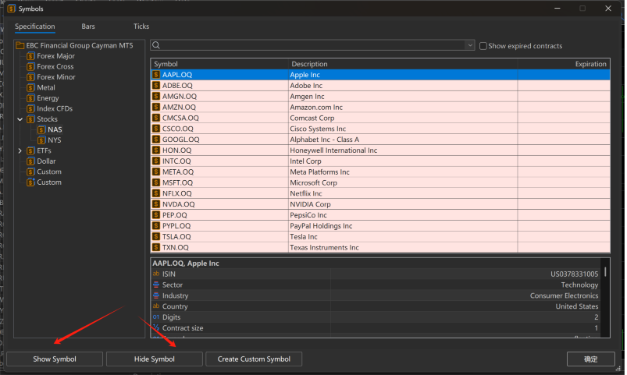
In the lower right corner of the product list, you'll find the specifications of the order.
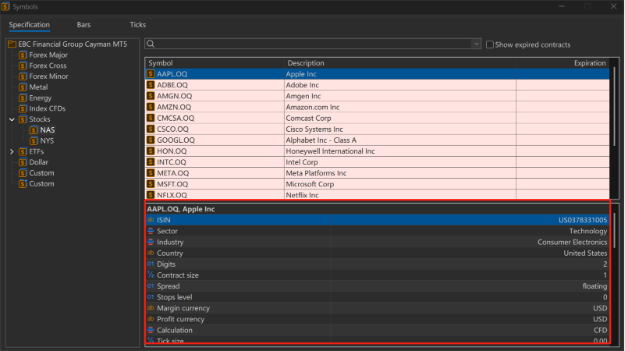
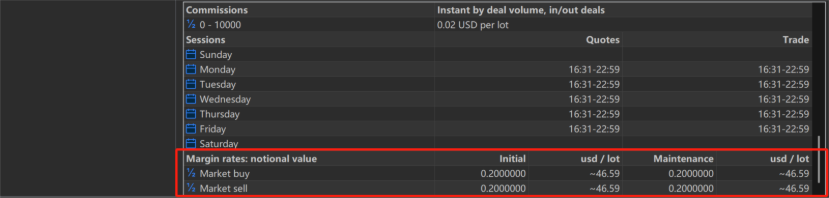
These display details such as trading hours, fees, and other conditions. They also indicate the minimum account equity required to maintain positions at a 100% margin level, helping traders keep track of their exposure in real time.
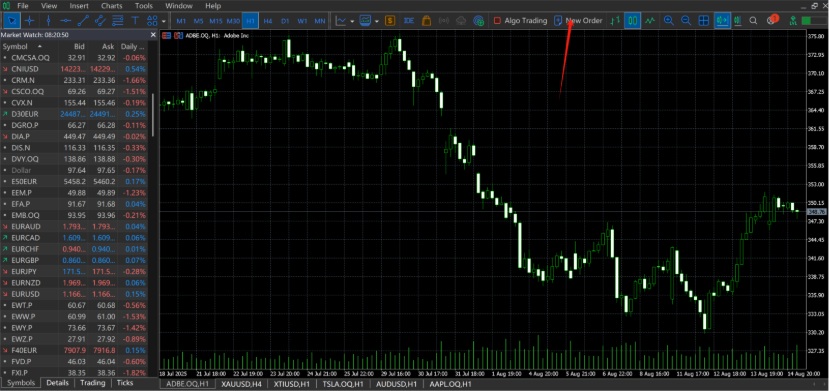
Click "New Order" on the shortcut toolbar.
MT5 will prompt the order page, based on your selected symbol. You can then adjust the trade size and set your take-profit (target price) and stop-loss (limit price) levels.
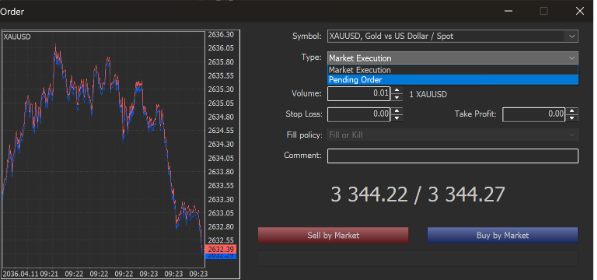
You can also manually change the symbol if you prefer.
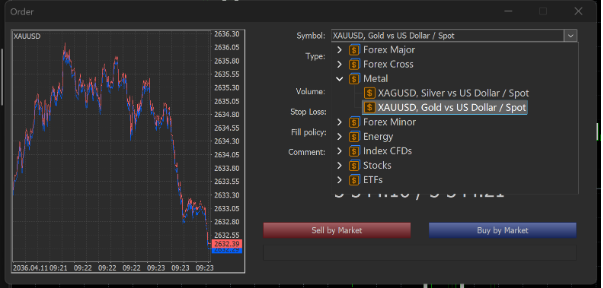
Pay attention to the order type: MT5 offers two main types of execution:
Market Execution – the order is filled immediately at the current price.
Pending Order – the order is triggered only when the market reaches your preset price.
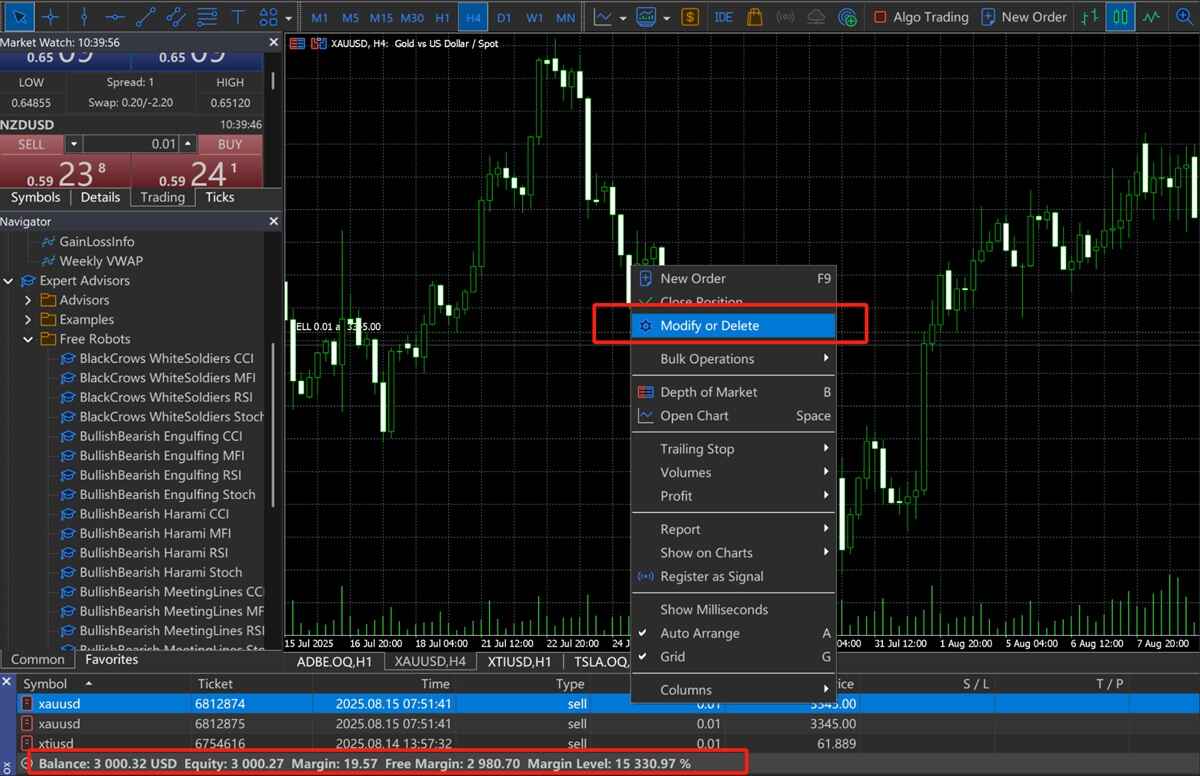
Once the order is confirmed, the details will appear in the Terminal panel at the bottom, showing your balance, equity, margin usage, and other key figures so you can monitor your positions in real time. Right-clicking on an order allows you to close, modify, or delete it.
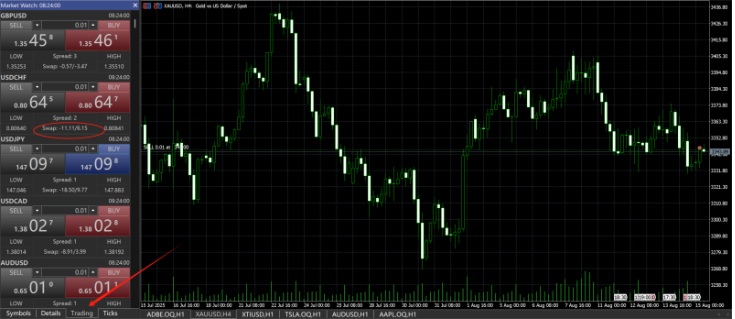
MT5 also features a trading panel in the left-hand sidebar. This allows for quick buy/sell actions, while also displaying real-time spreads and overnight swap rates to help you track your trading costs.
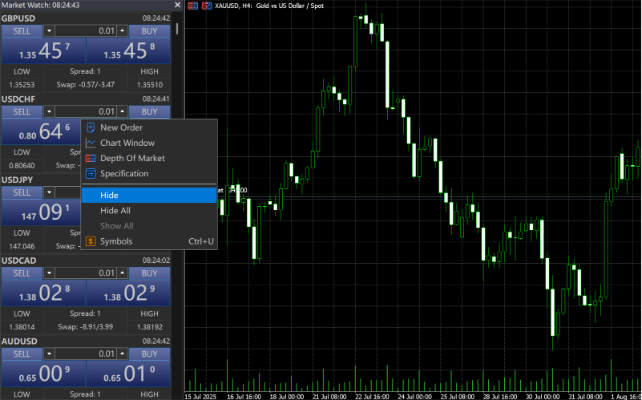
You can further tidy your workspace by right-clicking to hide symbols you don't wish to follow, improving overall efficiency.
These are the basics of downloading MetaTrader 5 and placing trades. In the next section, we'll cover some of MT5's advanced features.
Disclaimer: This material is for general information purposes only and is not intended as (and should not be considered to be) financial, investment or other advice on which reliance should be placed. No opinion given in the material constitutes a recommendation by EBC or the author that any particular investment, security, transaction or investment strategy is suitable for any specific person.
EBC Financial Group is a co-brand shared by a group of entities
including:
EBC Financial Group (SVG) LLC is authorized by the St.Vincent and the
Grenadines Financial Services Authority(SVGFSA),and the company
registration number is 353 LLC 2020, with registered address at Euro
House, Richmond Hill Road, Kingstown, VC0100, St. Vincent and the
Grenadines.
Other Relevant Entities
EBC Financial Group (UK) Limited is authorised and regulated by the
Financial Conduct Authority. Reference Number: 927552. Website: www.ebcfin.co.uk
EBC Financial Group (Cayman) Limited is licensed and regulated by the
Cayman Islands Monetary Authority (Number: 2038223). Website:
www.ebcgroup.ky
EBC Financial (MU) Limited is licensed and regulated by the the
Financial Services Commission, Mauritius (License Number GB24203273)
with registrated address at 3rd Floor, Standard Chartered Tower,
Cybercity, Ebene, 72201, Republic of Mauritius. Website for this entity
is maintained separately.
EBC Financial Group (Comoros) Limited is authorised by The Autonomous
Island of Anjouan, Union of Comoros Offshore Finance Authority with
License number L 15637/EFGC, with registered office address at Hamchako,
Mutsamudu, Autonomous Island of Anjouan, Union of Comoros.
EBC Financial Group (Australia) Pty Ltd (ACN: 619 073 237) is authorised
and regulated by the Australian Securities and Investments Commission
(Number: 500991). EBC Financial Group (Australia) Pty Ltd is a related
entity of EBC Financial Group (SVG) LLC. The two entities are managed
separately. The financial products and services offered on this website
are NOT provided by the Australian entity and no recourse against the
Australian entity is available.
EBC Group (Cyprus) Ltd, faciliates payment services to the licensed and
regulated entities within the EBC Financial Group strucutre, registered
under the Companies Law of Republic of Cyprus with the number HE 449205,
registered office address at 101 Gladstonos, Agathangelou Business
Centre, 3032 Limassol, Cyprus.
Business Address: The Leadenhall Building, 122 Leadenhall Street, London, United Kingdom, EC3V 4AB. Email Address :cs@ebc.com . Telephone : +44 20 3376 9662
Regional Restrictions:
EBC does not offer any services to citizens and residents of certain
jurisdictions including: Afghanistan, Belarus, Burma (Myanmar), Canada,
Central African Republic, Congo, Cuba, Democratic Republic of the Congo,
Eritrea, Haiti, Iran, Iraq, Lebanon, Libya, Malaysia, Mali, North Korea
(Democratic People's Republic of Korea), Russia, Somalia, Sudan, South
Sudan, Syria, Ukraine (including Crimea, Donetsk, and Luhansk Regions),
the United States, Venezuela, and Yemen.
Any Spanish on this website is for LATAM only and is not designated for
anyone in European Union or Spain For more information, please check out
our FAQs.
Any Portuguese on this website is for Africa only, and is not designated
for anyone in European Union or Portugal or Brazil. For more
information, please check out our FAQs.
Compliance Disclosure:The website can be accessed globally and is not specific to any entity. Your actual rights and obligations will be determined based on the entity and jurisdiction that you choose to be regulated.There may be local laws and regulations which prohibit or limit your rights to access, download, distribute, disseminate, share or otherwise use any or all of the documents and information published on this website.
Risk Warning: Trading Contracts for Difference (CFDs) are complex financial instruments and come with a high risk of losing money rapidly due to leverage. Trade on margin carries a high level of risk and may not be suitable for all investors. Before deciding to trade Forex and CFDs, you should carefully consider your trading objectives, level of experience and risk appetite. The possibility exists that you could sustain a loss of some or all of your initial trading capital. We recommend that you seek independent advice and ensure you fully understand the risks involved before making any investment decision. Please read the relevant risk disclosure statements carefully before trading.