Author: Ethan Vale
Published on: 2025-12-10
Updated on: 2025-12-11
As EBC's proprietary account analysis system, EBC Turbo not only continuously tracks account performance but also highlights optimisation opportunities based on professional indicators. It is compatible with EA trading and serves as a valuable tool for traders of all types looking to improve profitability.
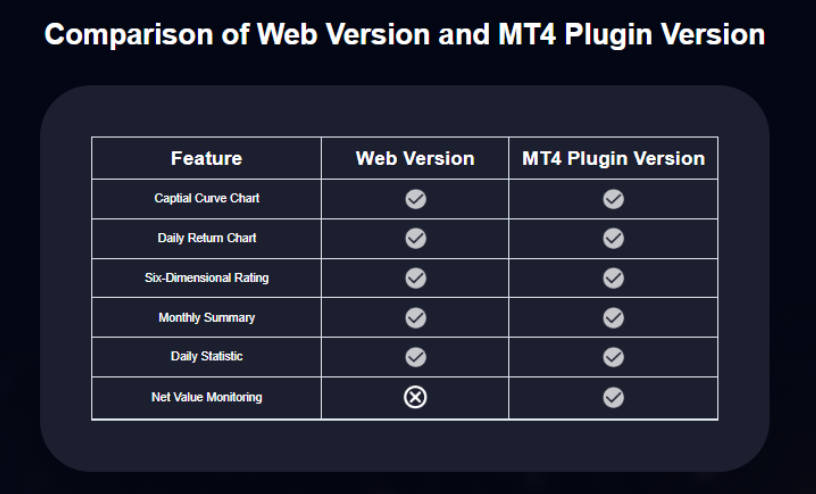
Web MT4 Version:
Provides core trading analysis features, requires no installation, and is easy to use.
Plugin Version:
Includes all features of the web version, with the additional "Equity Monitoring" feature (including equity charts). Requires installation of the MT4 plugin.
Users can choose the version that best suits their need for equity monitoring.
To use the web version of EBC Turbo, you first need to download the MT4 standard trading statement. The trading statement records all your trade details and serves as the foundation for analysis.
1. Open the MT4 client and click "Terminal" under the "View" menu at the top.

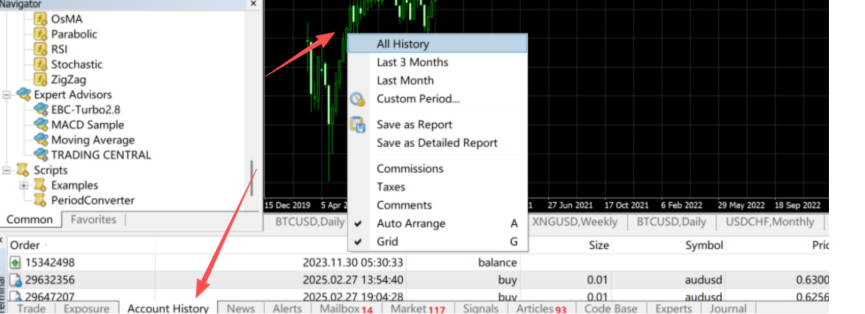
2. In the Terminal window, locate the "Account History" section at the bottom left. Right-click "Account History" and select "All History".
3. Right-click again and choose "Save as Detailed Account Statement".
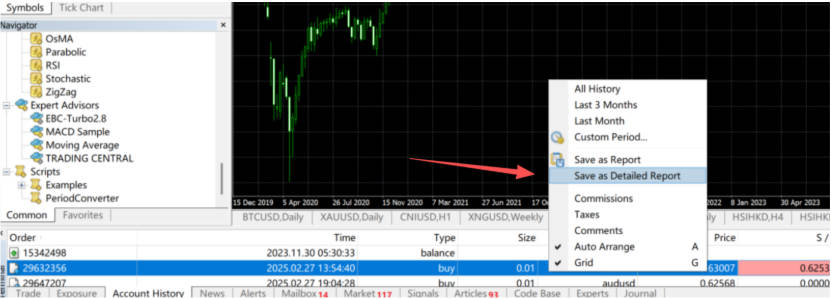
4. Important: The file must be saved in .htm format (an incorrect extension will prevent analysis).
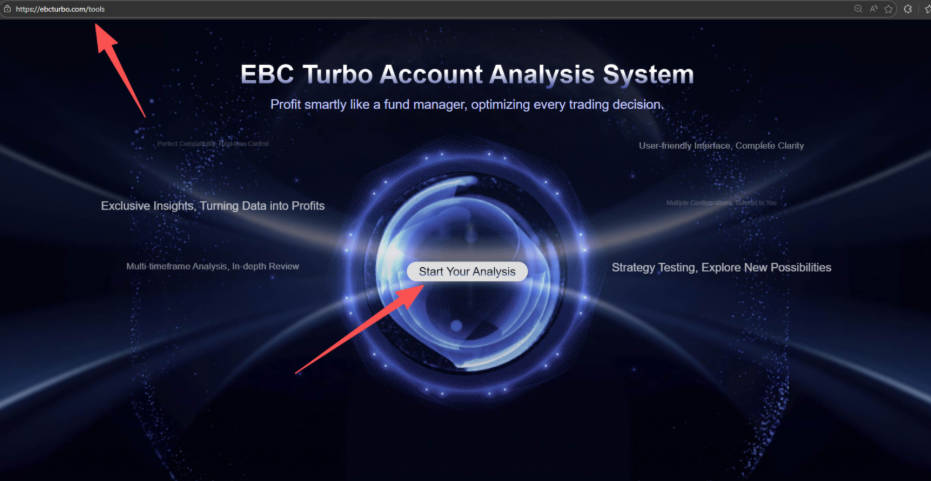
1. Open the official EBC Turbo website (www.ebcturbo.com) and click the "Start Analysis" button on the homepage.
2. Click "Upload File" and select the .htm statement downloaded in Step 1.
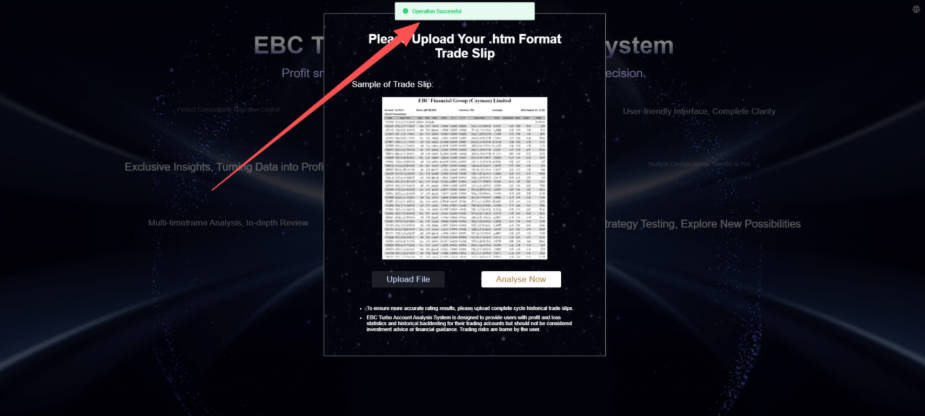
3. Once you see the "Operation Successful" message, click "Analyse Now" to automatically view your account analysis results.
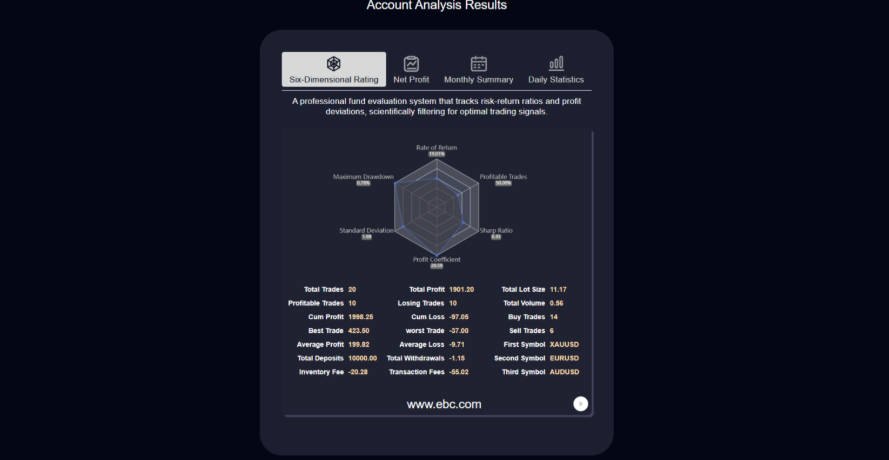
If you see "Operation Successful" but nothing happens when clicking "Analyse Now":
Reason 1:
Incorrect file format (not .htm) → Re-download the statement following Step 1. ensuring the extension is .htm.
Reason 2:
Statement is not in standard MT4 format → Uninstall any third-party modification tools and re-download the statement directly from the MT4 client.
Open the official EBC Turbo website.
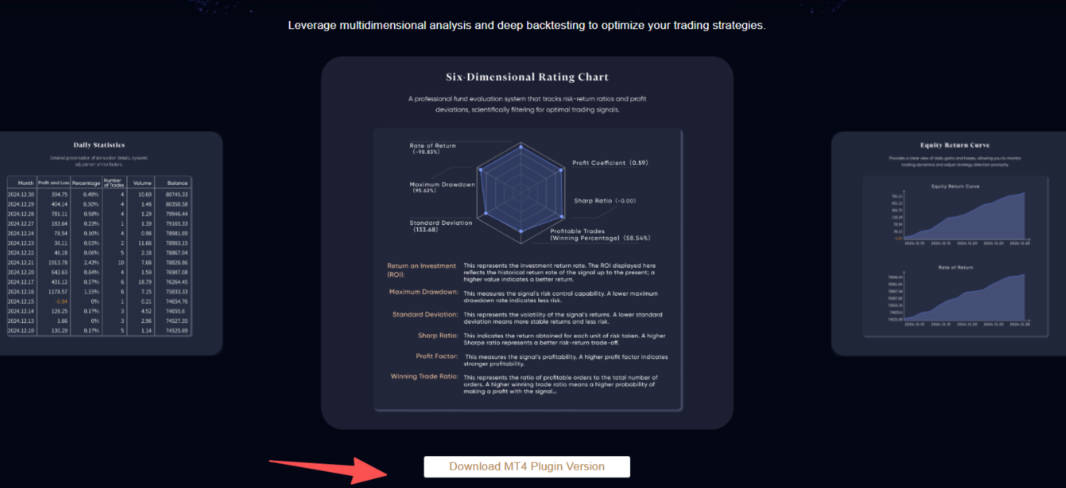
Click "Download MT4 Plugin Version" on the homepage and save the plugin file.
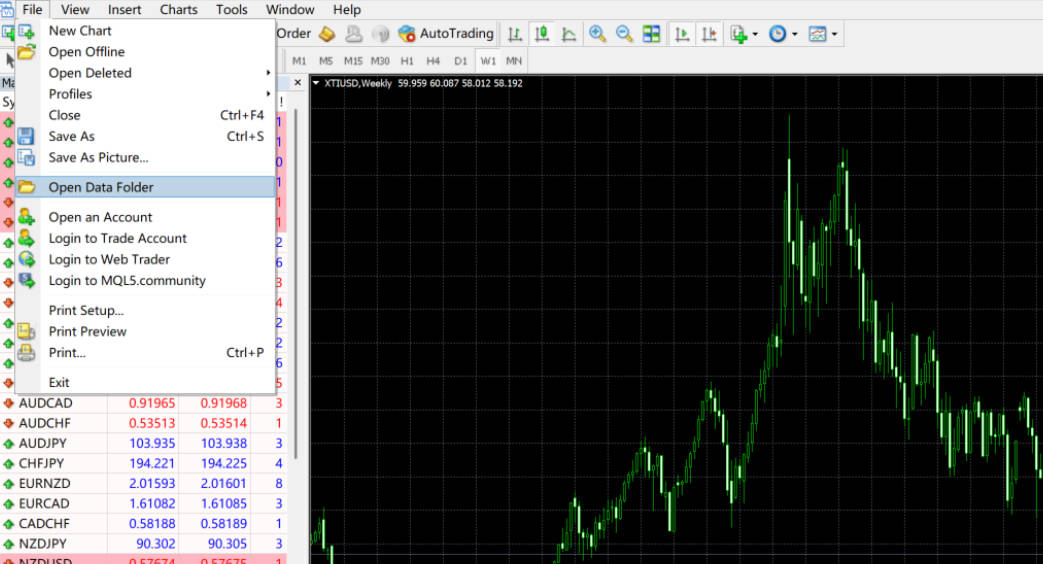
1. Open your MT4 client, click "File" in the top menu, then select "Open Data Folder" (this will open the local file folder).
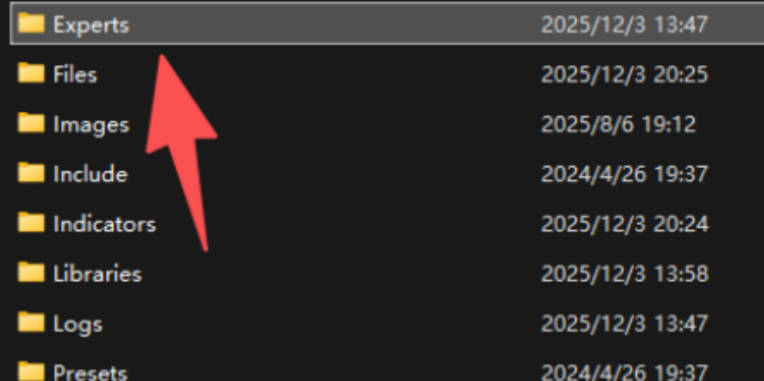
2. Locate the "MQL4" directory, double-click to open, then find the "Experts" folder. Place the downloaded EBC Turbo plugin file directly into this folder.
3. Restart the MT4 client (the plugin will only take effect after restarting).
1. After restarting MT4. click "View → Navigator". In the terminal window at the bottom left, find "Account History", right-click and select "All History" (same as Step 1–4 for the web version), then return to the Navigator window.

2. Expand the "EA Trading" directory, locate the EBC Turbo plugin, and double-click to launch.

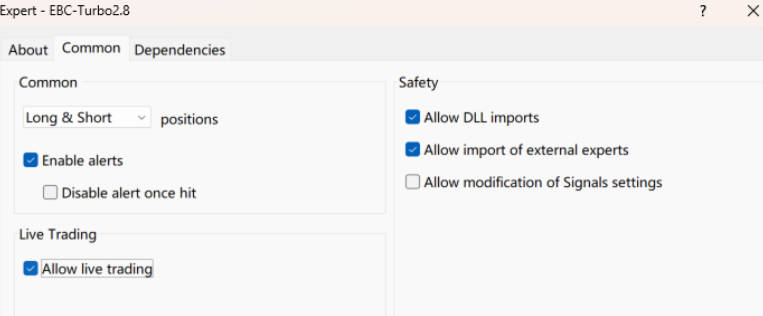
3. When the settings window appears, switch to the "Common" tab, tick "Allow Live Trading" and "Allow DLL Imports", then switch to the "About" tab and click "OK" to save the settings.
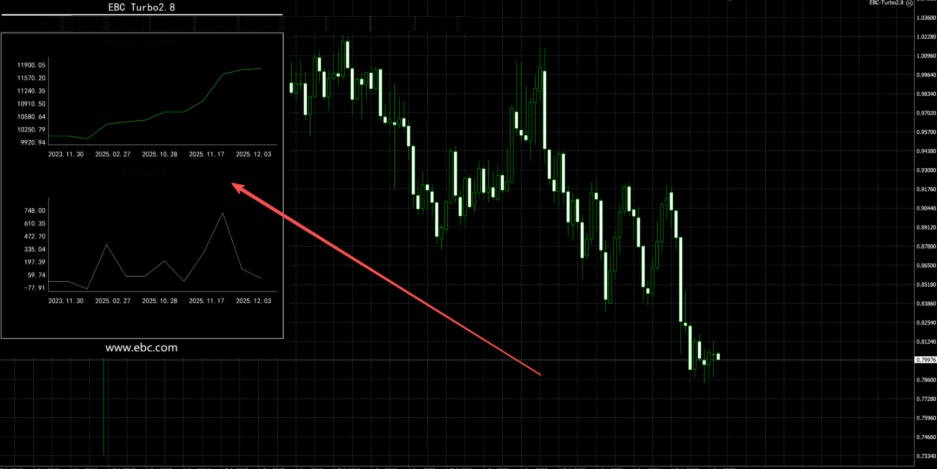
4. Return to the MT4 market screen and the EBC Turbo plugin will automatically appear.
Compared with the web version, the plugin additionally provides an equity chart.
These are the detailed installation and usage instructions, representing the first step to enabling professional account analysis. In the next guide, we will explain how to interpret the analysis indicators.
Disclaimer: This material is for general information purposes only and is not intended as (and should not be considered to be) financial, investment or other advice on which reliance should be placed. No opinion given in the material constitutes a recommendation by EBC or the author that any particular investment, security, transaction or investment strategy is suitable for any specific person.
EBC Financial Group is a co-brand shared by a group of entities
including:
EBC Financial Group (SVG) LLC is authorized by the St.Vincent and the
Grenadines Financial Services Authority(SVGFSA),and the company
registration number is 353 LLC 2020, with registered address at Euro
House, Richmond Hill Road, Kingstown, VC0100, St. Vincent and the
Grenadines.
Other Relevant Entities
EBC Financial Group (UK) Limited is authorised and regulated by the
Financial Conduct Authority. Reference Number: 927552. Website: www.ebcfin.co.uk
EBC Financial Group (Cayman) Limited is licensed and regulated by the
Cayman Islands Monetary Authority (Number: 2038223). Website:
www.ebcgroup.ky
EBC Financial (MU) Limited is licensed and regulated by the the
Financial Services Commission, Mauritius (License Number GB24203273)
with registrated address at 3rd Floor, Standard Chartered Tower,
Cybercity, Ebene, 72201, Republic of Mauritius. Website for this entity
is maintained separately.
EBC Financial Group (Comoros) Limited is authorised by The Autonomous
Island of Anjouan, Union of Comoros Offshore Finance Authority with
License number L 15637/EFGC, with registered office address at Hamchako,
Mutsamudu, Autonomous Island of Anjouan, Union of Comoros.
EBC Financial Group (Australia) Pty Ltd (ACN: 619 073 237) is authorised
and regulated by the Australian Securities and Investments Commission
(Number: 500991). EBC Financial Group (Australia) Pty Ltd is a related
entity of EBC Financial Group (SVG) LLC. The two entities are managed
separately. The financial products and services offered on this website
are NOT provided by the Australian entity and no recourse against the
Australian entity is available.
EBC Group (Cyprus) Ltd, faciliates payment services to the licensed and
regulated entities within the EBC Financial Group strucutre, registered
under the Companies Law of Republic of Cyprus with the number HE 449205,
registered office address at 101 Gladstonos, Agathangelou Business
Centre, 3032 Limassol, Cyprus.
Business Address: The Leadenhall Building, 122 Leadenhall Street, London, United Kingdom, EC3V 4AB. Email Address :cs@ebc.com . Telephone : +44 20 3376 9662
Regional Restrictions:
EBC does not offer any services to citizens and residents of certain
jurisdictions including: Afghanistan, Belarus, Burma (Myanmar), Canada,
Central African Republic, Congo, Cuba, Democratic Republic of the Congo,
Eritrea, Haiti, Iran, Iraq, Lebanon, Libya, Malaysia, Mali, North Korea
(Democratic People's Republic of Korea), Russia, Somalia, Sudan, South
Sudan, Syria, Ukraine (including Crimea, Donetsk, and Luhansk Regions),
the United States, Venezuela, and Yemen.
Any Spanish on this website is for LATAM only and is not designated for
anyone in European Union or Spain For more information, please check out
our FAQs.
Any Portuguese on this website is for Africa only, and is not designated
for anyone in European Union or Portugal or Brazil. For more
information, please check out our FAQs.
Compliance Disclosure:The website can be accessed globally and is not specific to any entity. Your actual rights and obligations will be determined based on the entity and jurisdiction that you choose to be regulated.There may be local laws and regulations which prohibit or limit your rights to access, download, distribute, disseminate, share or otherwise use any or all of the documents and information published on this website.
Risk Warning: Trading Contracts for Difference (CFDs) are complex financial instruments and come with a high risk of losing money rapidly due to leverage. Trade on margin carries a high level of risk and may not be suitable for all investors. Before deciding to trade Forex and CFDs, you should carefully consider your trading objectives, level of experience and risk appetite. The possibility exists that you could sustain a loss of some or all of your initial trading capital. We recommend that you seek independent advice and ensure you fully understand the risks involved before making any investment decision. Please read the relevant risk disclosure statements carefully before trading.